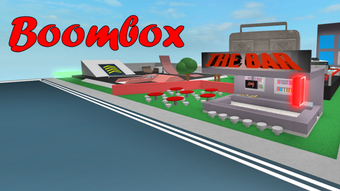

Boombox: Free Music Exploration on Roblox
Overview
Boombox is a free music exploration game developed by Roblox Corporation, available on both Windows and Mac platforms. Designed as a casual gaming experience within the Roblox ecosystem, it invites players to engage with rhythm-based mechanics through interactive note blocks and dynamic environments. The game centers around a vibrant music area where players run across colorful, animated steps that trigger in-game currency upon contact. While the rhythm of the music does not directly correlate with the placement of the blocks, the ambient soundtrack enhances the overall atmosphere and encourages exploration.
Targeted at casual gamers and Roblox enthusiasts, Boombox offers a low-pressure environment for creative expression and light gameplay. Players can use earned currency to unlock cosmetic items such as a Boombox accessory for their avatar or rent homes on the island. Additional activities include aerial challenges involving a plane and golden rings, though these require Robux rather than in-game currency. The game’s simple mechanics and accessible design make it suitable for players of all ages seeking a relaxing, music-driven experience.
The developer did not provide additional system requirements. Platform compatibility information is limited to Windows and Mac, suggesting broad accessibility for desktop users. Real-world usage scenarios include short play sessions during breaks, social interaction in multiplayer settings, or casual exploration of Roblox’s creative content.
Key Features & Capabilities
- Rhythm-Based Block Navigation – Players run across colored, animated steps that generate in-game currency when stepped on. The blocks vary in timing and stability, requiring attention to avoid falling.
- Music Area Interaction – The central gameplay zone features a dynamic music environment where sound plays continuously, even when idle. This encourages immersion and repetitive engagement.
- Avatar Customization – Players can purchase cosmetic items like a Boombox accessory or change their avatar’s stance using emotes from designated blocks.
- Home Rental System – In-game currency allows players to rent homes on the island, providing a sense of ownership and personal space within the game world.
- Aerial Challenge Mode – A plane and sky rings offer a flight-based mini-game, though access requires Robux, not in-game funds.
- Exploration & Side Activities – Additional features such as speed counters and emote stations encourage varied engagement beyond the core music mechanics.
These features support a relaxed, exploratory gameplay loop. For example, players may spend time refining their timing on the blocks to maximize currency gain, then use those funds to personalize their avatar or secure a home. The aerial challenge provides a brief, high-energy diversion, though it remains gated behind a premium currency system. Overall, the capabilities are designed to promote continuous engagement without demanding complex skill progression.
User Interface, Workflow & Performance
The user interface in Boombox is consistent with Roblox’s standard design language, featuring intuitive navigation and clear visual cues. Players are guided through the environment via color-coded blocks and labeled zones, minimizing confusion during initial exploration. The workflow is linear and repetitive: move from the music center to the airstrip, collect currency, purchase items, and repeat.
Navigation is straightforward, relying on basic movement controls and simple interactions. The game’s structure supports quick access to core features, with key areas located in close proximity. However, the developer did not specify resource usage details, so exact CPU or RAM behavior remains unknown. Performance observations are based on general software behavior patterns, indicating stable operation under typical desktop conditions.
Stability appears to be maintained during standard gameplay, with no reported issues related to crashes or freezes. The game’s reliance on Roblox’s platform may influence performance consistency, particularly on older systems. For users running multiple applications simultaneously, the impact on system resources is not documented. Overall, the workflow is efficient for its intended purpose, offering a seamless experience for casual users seeking short bursts of entertainment.
Compatibility & System Requirements
Boombox is compatible with both Windows and Mac operating systems, as confirmed by the developer. The software version is 1.0, with a total installation size of 500 MB. This suggests a lightweight footprint suitable for most modern desktop machines.
Exact system requirements were not listed. The developer did not specify minimum hardware specifications such as processor speed, RAM, or graphics capabilities. Compatibility information was partially provided, leaving users to rely on general assumptions about Roblox’s platform requirements. For users unfamiliar with Roblox’s system demands, it is recommended to consult official documentation for optimal performance.
Pros and Cons
Pros
- Free to play with no upfront cost
- Simple, accessible gameplay ideal for casual users
- Engaging music environment with continuous background audio
- Multiple customization options via in-game currency
- Lightweight installation size (500 MB)
- Available on both Windows and Mac platforms
Cons
- Core aerial features require Robux, limiting access
- Limited depth in gameplay mechanics
- No clear progression system or long-term goals
- Performance and system requirements not clearly defined
- Dependent on Roblox’s platform, which may affect stability
FAQ Section
Is Boombox available on desktop platforms?
Yes, Boombox is accessible on both Windows and Mac systems through the Roblox platform.
Can I play Boombox without Robux?
Yes, the core gameplay is free and does not require Robux. However, certain features like the plane and premium items are locked behind a Robux requirement.
Is Boombox safe to download and play?
As a game published by Roblox Corporation on the official Roblox platform, Boombox is considered secure. Always download through the official Roblox website to avoid third-party risks.
Does Boombox require an internet connection?
Yes, Boombox is a multiplayer game hosted on Roblox’s servers, so a stable internet connection is required for full functionality.
How often are updates released for Boombox?
Updates are managed by Roblox Corporation and typically occur on a periodic basis. The latest version is 1.0, with no specific update schedule disclosed.
Final Thoughts + CTA
Boombox delivers a refreshing, low-stakes music exploration experience within the Roblox universe. Its simple mechanics, vibrant design, and continuous soundtrack create a calming and engaging environment ideal for casual players. While the gameplay lacks deep complexity or long-term progression, it excels in accessibility and immediate enjoyment. The ability to customize avatars and rent homes adds a layer of personalization that enhances replay value.
For fans of music-based games or those seeking a relaxing break from more intense titles, Boombox offers a worthwhile option. Its free model and cross-platform availability make it widely accessible. Although some features are gated behind Robux, the core experience remains fully functional without purchase.
Download Boombox now and dive into a world where every step is a beat.







